So you want to build a web app. Maybe a SaaS, a side project, or genuinely the next big thing. Either way, you need the right tools — and the ones below are what thousands of developers are using right now to go from idea to live product, fast.
Here’s every tool, what it does, and why you need it.
1. Cursor — Coding
Cursor is a code editor that seems like it’s built only with AI in mind. Instead of Googling syntax or copying Stack Overflow answers, you just describe what you want — “add a login page with Google sign-in” — and Cursor writes it. It reads your whole codebase, so suggestions actually fit your project.
Tip: Next.js as the framework and ShadCN for pre-built UI components — buttons, forms, modals, all of it — so you’re building, not designing from scratch.
Use it for: Everything for building the application from scratch.
2. Supabase — Simplified Backend
Supabase gives you a database, user authentication, and file storage — all without writing a backend from scratch. It runs on PostgreSQL (the most-trusted & most loved database, at least I love it) and comes with a clean dashboard for managing all your data.
Sign-ups, saved data, uploaded files — it all lives here.
Use it for: Storing data and handling user accounts. A simplified low-code version of a backend.
3. Stripe — Payments
Stripe is how the internet takes payments. Credit cards, Apple Pay, subscriptions, one-time purchases, refunds — it handles all of it. You never touch your users’ card details; Stripe deals with all the sensitive stuff and so you don't have to deal with any legal issues. Your job is simply to integrate Stripe into your app.
Use it for: Any time you want to charge someone money.
4. Resend — Emails That Don’t End Up in Spam
Every app sends emails — welcome messages, password resets, receipts. Getting those to actually land in the inbox (and not spam) is harder than it sounds. Resend is built specifically for developers, takes minutes to integrate, and has a well-known reputation for ensuring emails arrive in the inbox.
Use it for: Any automated, transactional email your app needs to send.
5. PostHog — Analytics
After you launch, the real question is: are people actually using it? PostHog tells you. It records user sessions, tracks clicks and page views, shows you where people drop off, and lets you run A/B tests. You can literally watch a replay of someone navigating your app.
Use it for: Understanding user behavior and making decisions based on data and generating end-user analytics as well.
6. Inngest — Background Processing (Queues)
Some tasks shouldn’t make a user sit and wait — processing a video, sending a batch of emails, retrying a failed API call. Inngest takes those jobs off the main process and runs them quietly in the background. It also handles scheduled tasks, like “run this every night at 2am.”
Key Feature: The problem with long-running tasks is that if a 10-minute job fails at minute 9 — network issue, API timeout, server restart — you have to start from zero. The data is lost. Step functions solve this by checkpointing (breaking down a single function into multiple step functions).
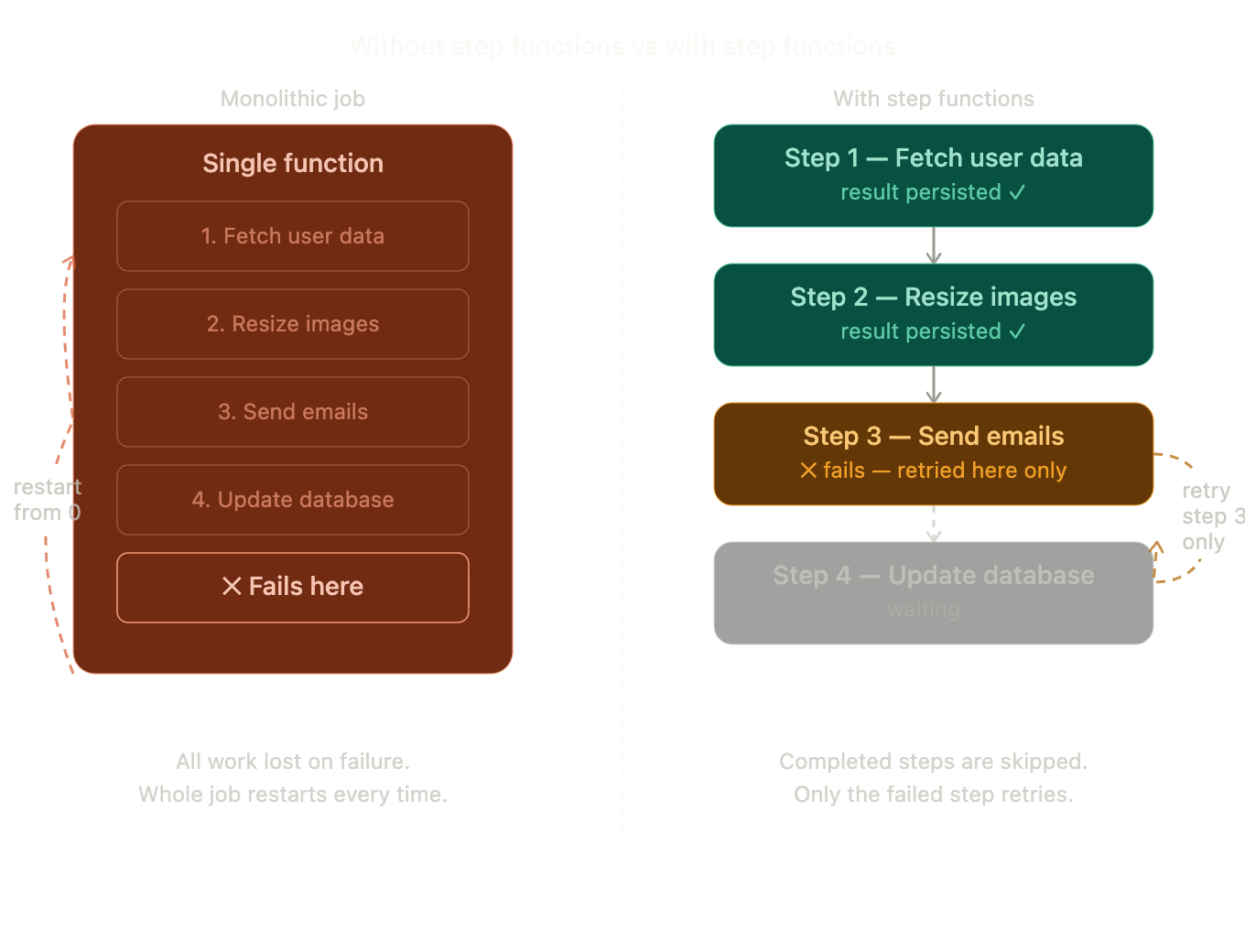
Use it for: Anything slow, scheduled, or that needs to retry automatically if it fails.
7. Vercel — Ship it!
Vercel hosts your app. You connect your GitHub (It’s a must; you need a version control system) repo, push your code, and it’s live. Every update you push redeploys automatically. Since Vercel is built by the same team behind Next.js, the two work together perfectly — Deployment is relatively much easier with zero configuration.
Use it for: Deploying and hosting your Next.js app.
8. Namecheap — Your Domain
This is where you buy your domain — yourstartup.com. It’s affordable, no-nonsense, and doesn’t spam you with upsells. You buy it, point it at Vercel, and your app has a real address instead of a random “.vercel.app” URL that Vercel provides.
Use it for: Day one. Buy the domain before someone else does.
9. Sentry — Error Tracking ✦
Sentry watches your app 24x7. The moment something crashes, it tells you exactly what broke, which line of code, and which user was affected. Without it, you find out your app is down when someone complains. With it, you’re already fixing it before they notice.
Use it for: Error monitoring from the day you go live.
10. Pinecone — AI ✦
Think about how Google works. You don't type exact words from a webpage — you describe what you're looking for, and it figures out what you mean. That's the kind of intelligence Pinecone brings to your app.
If you’re building anything AI-powered — smart search, “chat with your docs”, recommendation systems — you need Pinecone. It stores data as vectors, which are mathematical representations of your pre-defined text. So a search for “budget travel in summer” doesn’t just match those words — it finds everything semantically related to that idea, so it can generate. Makes sense?
Use it for: AI search, recommendation systems, RAG pipelines, and any feature that needs to understand meaning, not just match text.
How It All Fits Together
A user finds your domain (Namecheap) → hits your frontend (Cursor · Next.js · ShadCN) → served from (Vercel) → signs up via (Supabase) → gets a welcome email through (Resend) → pays via (Stripe) → their behavior is tracked by (PostHog) → background jobs run through (Inngest) → errors caught by (Sentry) → AI features powered by (Pinecone)
Ten tools. Each one does exactly one thing. Together, they give a solo developer the combined power of a full engineering team.
Now time to build that idea of yours.
✦ Optional but highly recommended · Stack: Next.js · ShadCN · Supabase · Stripe · Resend · PostHog · Inngest · Vercel · Namecheap · Sentry · Pinecone